
Xml Validator
An XML file that isn’t well-formed won’t load at all — one missing closing tag or unescaped ampersand breaks the whole document. This validator uses your browser’s own XML parser to check the document, points to the line with the problem, and then helps you work with the XML: format it for reading, minify it for transport, inspect its structure and test XPath expressions.
- Free to use
- No sign-up
- Runs in your browser
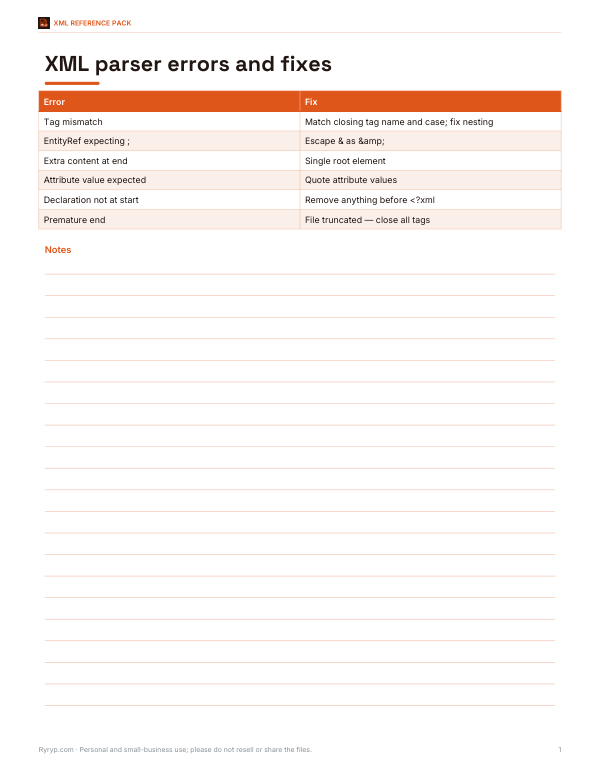
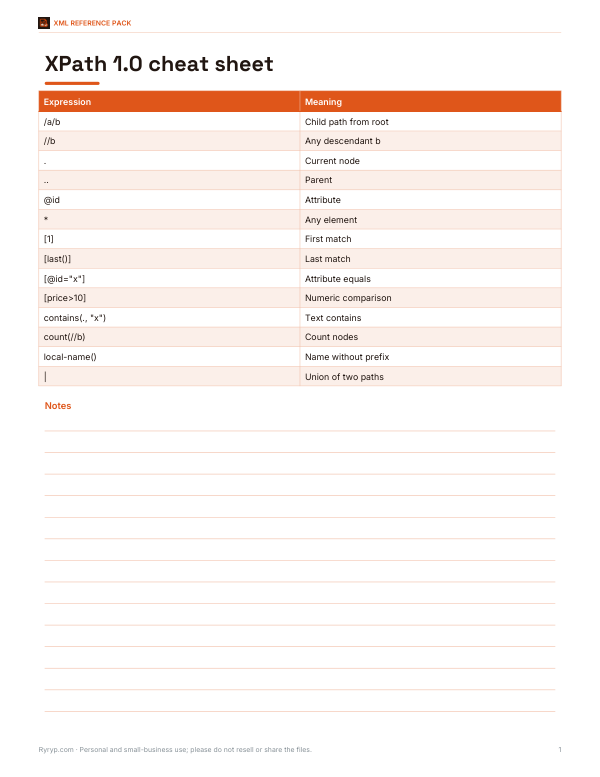
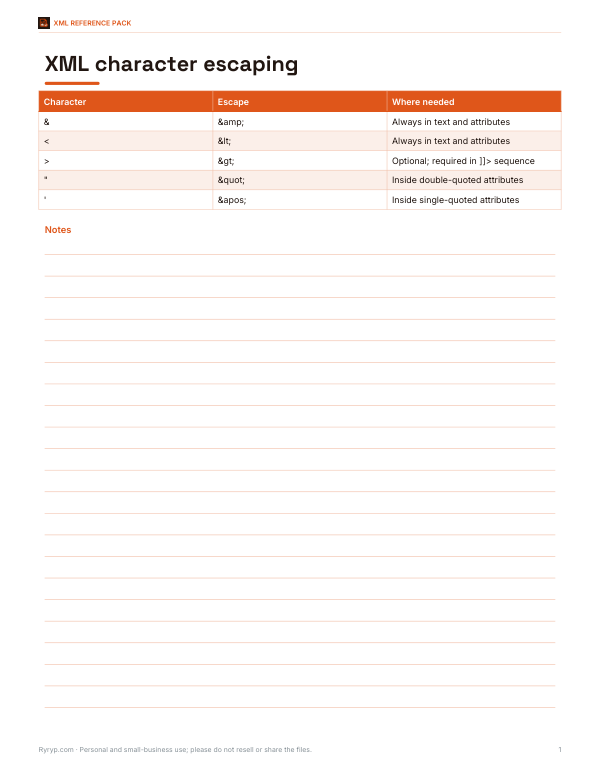
XML validator and formatter
XPath tester
XML Reference Pack
Printable XML reference: well-formedness rules and error guide, XPath cheat sheet, character escaping table and an XML review checklist.
- Error guide (PDF)
- XPath cheat sheet (PDF)
- Escaping table (PDF)
- Review checklist (PDF/DOCX)
Formats: PDF, DOCX. Instant download after payment (link valid 72 hours, up to 5 downloads). AI-assisted: the templates were drafted with AI help and reviewed and laid out before publishing.
$5.00 USD, one-time 4 files · about $1.25 each
- Instant download
- 7-day refund
- Secure checkout by Stripe
7-day money-back guarantee. Full refund within 7 days of purchase, even after you download.
Free sample: XML Error Guide (PDF, 60 KB)
Full refund within 7 days — see the refund policy and license.
Free printables
Single sheets you can print right now, no sign-up. The full pack adds every sheet in one download plus the editable files.
 Printable XML Review Checklist
Well-formed vs valid XML
| Check | What it means | What this tool does |
|---|---|---|
| Well-formed | The document follows XML syntax rules and can be parsed | Checks it, with error location |
| Valid (DTD) | The document matches a Document Type Definition | Not checked |
| Valid (XSD schema) | Elements, attributes, types and order match an XML Schema | Not checked |
| Semantically correct | The data makes sense for your application | Up to you |
Every valid document must be well-formed, but a well-formed document isn’t necessarily valid. Well-formedness is the first and most common problem when a file won’t load, so it’s the first thing to check.
The rules of well-formed XML
- There is exactly one root element that contains everything else.
- Every start tag has a matching end tag, or the element is self-closing: <br/>.
- Elements are properly nested: text, never text.
- Tag names are case-sensitive: <Book> and </book> don’t match.
- Attribute values are quoted, and an element can’t repeat the same attribute.
- The characters < and & in text must be escaped as < and & (or placed in a CDATA section).
- If present, the XML declaration must be the very first thing in the file.
Common error messages
| Message (varies by browser) | Usual cause |
|---|---|
| Opening and ending tag mismatch | A closing tag is misspelled, missing, or in the wrong order |
| xmlParseEntityRef: no name / EntityRef: expecting ; | An unescaped & — write & |
| Extra content at the end of the document | More than one root element, or text after the root closes |
| Attribute without value / AttValue: " or ' expected | An attribute is missing quotes |
| XML declaration allowed only at the start | Blank lines or a byte-order mark before <?xml |
| Premature end of data | The file was cut off before closing tags |
Different browsers word their messages differently, but they all report the line (and usually the column) where the parser gave up — the actual mistake is often on that line or shortly before it.
Worked example
A product feed fails to import. Pasting it here shows “EntityRef: expecting ;” on line 214, which reads <title>Salt & Pepper Grinder</title>. Changing the ampersand to & fixes it, and validation now reports well-formed XML with 1 root, 3,120 elements and a maximum depth of 4. Running the XPath //item[not(price)] then finds the two products missing a price before the feed is re-submitted.
Using the XPath tester
| XPath | Selects |
|---|---|
| /catalog/book | book elements directly under the root catalog |
| //book | all book elements anywhere |
| //book/@id | the id attribute of every book |
| //book[price > 10] | books whose price is greater than 10 |
| count(//book) | the number of book elements |
| //*[local-name()='title'] | title elements in any namespace |
Namespaced elements need either a prefix declared on the root element (such as dc: in the sample) or the local-name() function. The tester uses your browser’s XPath 1.0 engine.
Pretty-print and minify
Pretty-printing puts each element on its own line with indentation, which makes structure and errors easier to see. Minifying removes the indentation and line breaks between elements, reducing file size for transport. Both keep the content the same; whitespace inside text is trimmed at the ends, so if whitespace in text matters for your application (for example with xml:space="preserve"), check the result.
Encoding and special characters
The XML declaration’s encoding attribute tells parsers how to read the bytes of the file; UTF-8 is the default and by far the most common. Problems appear when a file is saved in one encoding but declares another — accented letters turn into garbled characters or the parser stops. When opening a file here, your browser reads it as UTF-8; if the text looks wrong, re-save the file as UTF-8 in your editor. Characters that are hard to type can be written as numeric references, such as © for © or € for €.
CDATA sections and comments
- A CDATA section, <![CDATA[ … ]]>, lets you include text containing < and & without escaping — common for embedded HTML or code.
- The only sequence not allowed inside CDATA is ]]>, which ends the section.
- Comments are written <!-- … --> and cannot contain two hyphens in a row.
- Processing instructions, such as <?xml-stylesheet … ?>, pass instructions to applications and are kept when formatting.
Checking XML against a schema
If your XML must follow a specific schema — for example an e-invoicing standard, a sitemap or a vendor’s feed format — first make it well-formed here, then validate it with a schema-aware tool: many code editors and IDEs, command-line tools such as xmllint, or the validation service provided by the organisation that publishes the schema. The error messages there refer to elements, attributes and data types rather than syntax.
Where you meet XML
- Configuration files (.config, .csproj, Maven pom.xml, Android manifests)
- Data feeds: RSS and Atom, product feeds, sitemaps
- Office documents — .docx and .xlsx files are zipped XML
- SVG graphics
- SOAP web services and many industry standards (e.g. invoices, healthcare, finance)
Privacy
Your XML is parsed by your own browser. Nothing is uploaded, which makes the tool safe for configuration files and data you shouldn’t share.
Frequently asked questions
How do I check if XML is valid?
Paste it here to check it is well-formed; checking against an XSD schema needs the schema and a validating tool.
What makes XML not well-formed?
Missing or mismatched tags, unescaped & or <, unquoted attributes or more than one root element.
How do I escape an ampersand in XML?
Write & instead of &.
Can this tool validate against an XSD?
No — it checks well-formedness and structure in your browser.
What is XPath?
A query language for selecting nodes in an XML document.
Is my XML uploaded?
No. Everything stays in your browser.